Billing and Hosting Fees
Understand Stripe setup, team registration payments, hosting fees, and schedule change fees.
Billing in hoops.love covers two separate things:
- Team registration payments — money captains pay you when they register a team.
- hoops.love hosting fees — the fee you pay hoops.love for running your league.
You can use hoops.love without connecting Stripe. Stripe is only required if you want captains to pay inside hoops.love during registration.
Billing Page
Open Billing from your account menu to connect Stripe or review your connected Stripe account.
If Stripe is not connected, the Billing page shows a "Connect to Stripe" message. Click "Connect to Stripe" to start Stripe onboarding. You will leave hoops.love, complete Stripe's setup steps, and return to the Billing page afterward.
If you start Stripe setup but do not finish it, the Billing page will keep showing the setup prompt. You can click the button again to continue.
After Stripe setup is complete, the Billing page can show Stripe-powered account tools such as balances, payments, and Stripe account notifications. The "More on Stripe" button opens your Stripe dashboard.
If the Billing link in the app menu shows an "Issue" badge, open the Billing page and follow the Stripe notification. Stripe may need more account information before payments or payouts can continue normally.
Team Registration Payments
When you set up league registration, choose how captains pay to join:
- External payments — you collect money outside hoops.love. You can add an optional payment link and payment note, but you are responsible for tracking who has paid.
- In-app payments — captains must pay during registration. hoops.love tracks the payment automatically and marks the team as paid.
In-app payments require:
- A connected Stripe account.
- A team registration fee greater than $0.
If Stripe is not connected, registration settings show a Billing Setup Required message and link you to the Billing page.
In-app payments have a processing fee. You can choose whether captains pay that fee with "Pass along fees." When that is on, captains pay the registration amount plus processing fees. When it is off, captains pay the registration amount and the fee comes out of what you receive.
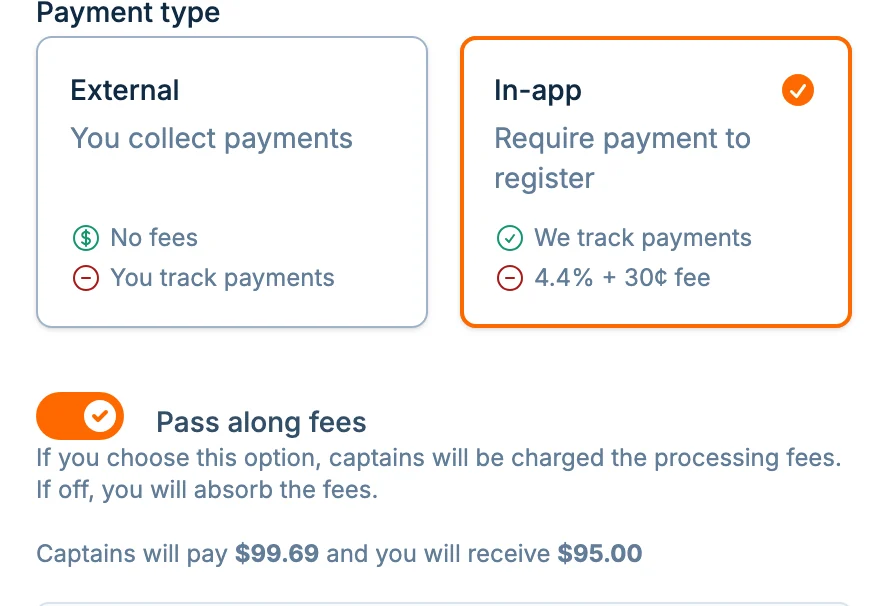
For the registration form details, see Registration Settings.
Hosting Fees
Your hoops.love hosting fee is separate from team registration payments. Registration payments are money you collect from teams. The hosting fee is what you pay hoops.love.
During league setup and registration settings, hoops.love shows an estimated hosting fee based on your league size. After registration closes and the schedule is ready, the fee can be updated based on the teams actually included in the schedule.
You can review current public pricing on the hoops.love pricing page.
You can see the hosting fee in Advanced Manager Settings on the league schedule page:
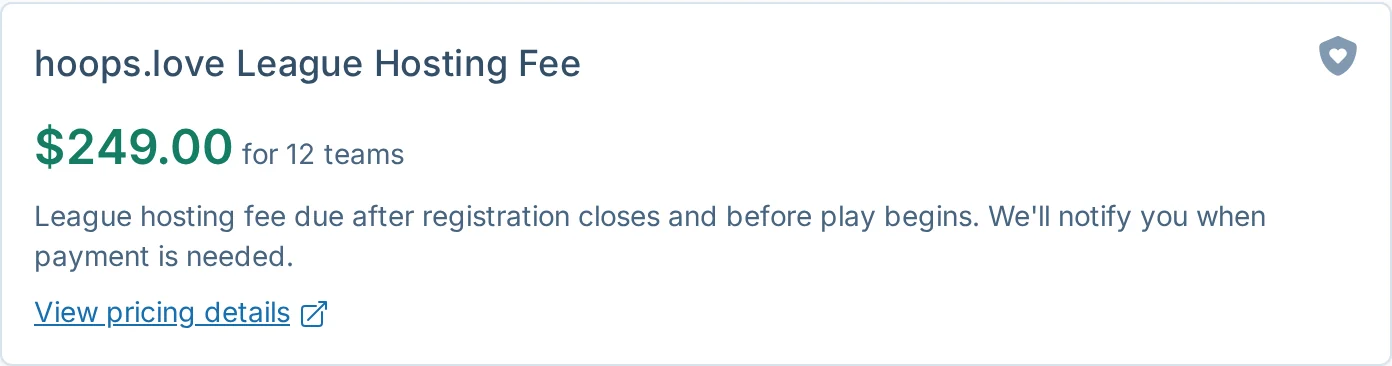
The fee summary can show:
- The current amount due.
- The number of teams used for the fee.
- Any pricing override or discount reason.
- Schedule change fees, if extra schedule changes have added fees.
If hoops.love does not have an automatic pricing tier for your league, the fee may show "We'll talk." That means support needs to review the league and confirm pricing with you.
Volume Pricing
If you run many leagues, manage a venue, or want to package multiple seasons together, contact support before creating everything. We can talk through bundled, packaged, or discounted account-level pricing based on your expected number of leagues, team counts, and season structure.
When Payment Is Due
The hosting fee is due after registration closes and before play begins. hoops.love will notify you when payment is needed.
If you have an unpaid balance, the app shows an "Upcoming Payment Required" banner. That banner shows the outstanding balance and a "Pay Now" button. Clicking "Pay Now" opens Stripe Checkout.
If you manage more than one event with unpaid balances, the checkout can include multiple unpaid hosting fees together.
Schedule Change Fees
Each league includes free schedule changes for normal setup and adjustment:
| Change Type | Free Allowance |
|---|---|
| Schedule rejections | 3 |
| Late team adds | 2 |
| Late team drops | 2 |
After the free allowance, each additional schedule change adds a $30 fee to the hosting fee.
The app warns you before an action will use a free change or add a fee. Schedule change fees appear in the hosting fee summary and are included in the balance when payment is due.
For the full policy, see Schedule Change Fees.
Common Questions
Do I need Stripe to run a league?
No. Stripe is only required for in-app team registration payments. You can run a league with external payments or no team registration fee without connecting Stripe.
Does hoops.love hold my registration money?
No. In-app registration payments are processed through your connected Stripe account. Use the Billing page or Stripe dashboard to review payments, balances, and payouts.
Can I use Venmo, PayPal, cash, or another payment method?
Yes. Choose external payments and add payment instructions or a payment link. hoops.love will not enforce payment automatically in that mode, so you will need to track payment status yourself.
Why does my hosting fee not match the public pricing page?
Your league may have a pricing override, discount, or a format that needs support review. The hosting fee summary will show an override reason when one is available. If the amount looks wrong, contact support.
Do you offer discounts for running many leagues?
Possibly. If you are running many leagues, managing a large venue, or looking for a bundled or packaged rate across multiple seasons, contact support with your expected league count, team counts, and timing.
What if I paid, but the app still says payment is required?
Do not pay again. Contact support so we can review the Stripe payment and your league billing record.