Schedule Maker
Make a league schedule for free, change it with plain-language requests, download it, or host the league.
Schedule Maker makes a balanced league schedule without hosting the league on hoops.love. Use it when you run the league yourself and just need the schedule. You don't need an account.
Open it from Create a Schedule in the hoops.love menu, or go to Schedule Maker.
Make A Schedule
Select New schedule, then answer three steps:
- When do you play? Pick the first and last nights of the season, the first start time, how many courts you have, and how long each game runs.
- Add your teams. Type them in, paste a list, or upload a spreadsheet, PDF, or screenshot of your team list. Check the list before you continue.
- Any scheduling requests? Add requests like a team that can't play early or a night off. You can skip this step.
Schedule Maker then builds the schedule while you wait. It balances opponents, shares early and late times as evenly as your requests allow, and builds in your requests. Major US holidays, like Thanksgiving and the Fourth of July, are left out as nights off. Schedule check shows how balanced the schedule is, and any request that couldn't fit.
A schedule can have up to 32 teams.
Change The Schedule
Type a change into the request box, then select Update schedule. Write it the way you'd say it, like "We're closed the third week. Move it to the end of the season." On a computer, you can also tap games on the schedule to point your request at them.
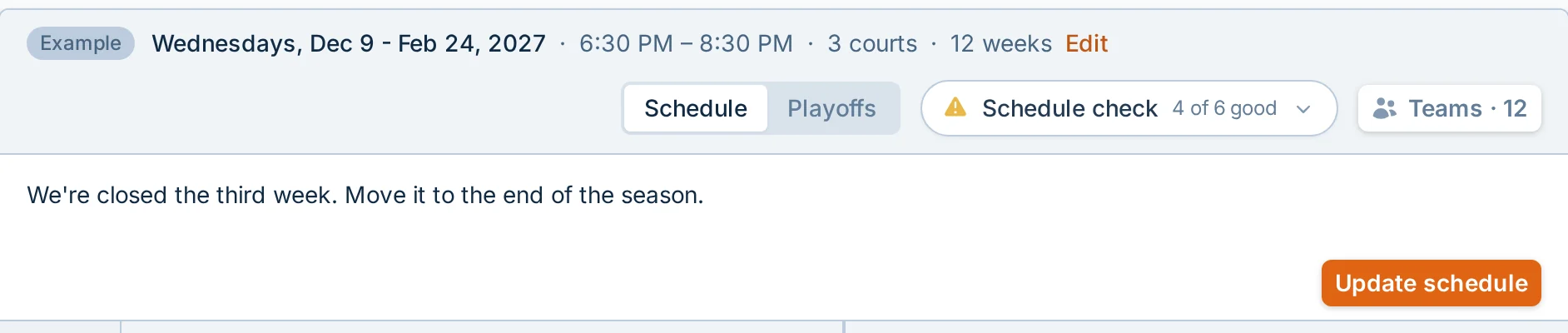
If a request is unclear, Schedule Maker asks a question before it changes anything. Use undo and redo to step between versions.
To change the night, times, courts, or weeks, select Edit next to the schedule summary. To add or rename teams, open Teams. Add playoffs from the Playoffs tab.
Get The Full Schedule
Some weeks in the middle of the season stay hidden until you get the full schedule. To see every week:
- Select Get the full schedule on the hidden weeks.
- Choose Just the schedule.
- If you aren't signed in, enter your email and agree to the terms.
- Pay on Stripe's checkout page if your schedule isn't free.
Every week then shows. If you entered your email, we send you a link back to the schedule. Use that link to open it on another device.
Pricing
| Teams | Price |
|---|---|
| 8 or fewer | Free |
| 9 to 32 | $1.50 a team, for every team |
For example, a 12-team schedule is $18. The price shows before you pay.
After you have the full schedule, most changes are free: requests, team names, notes, and settings. Two changes ask you to get the schedule again:
- Adding teams past the number you got the schedule for. You pay only for the added teams. A schedule that grows from 8 teams to 9 or more pays for every team, since it is no longer free.
- Changing the first date or the number of weeks. That counts as a new season's schedule, at its full price, unless you already got the schedule for those dates.
Download The Schedule
Once you have the full schedule, select Download and choose a format:
- Spreadsheet — An
.xlsxfile with the schedule, a weekly view, and a team list. - PDF — A printable copy.
If your schedule has playoffs, the spreadsheet and PDF include the bracket.
- Calendar — An
.icsfile for Google Calendar, Apple Calendar, or Outlook. Choose the whole league, or one team.
A download is a snapshot. Later changes don't update a file you already downloaded.
Host The League Instead
You can host the league on hoops.love instead of downloading the schedule. Your teams, weeks, and schedule come with you, and teams get the schedule on their phones, captains report scores, and standings update themselves.
Hosting a league from Schedule Maker is 20% off the regular hosting price. Anything you already paid for the schedule also comes off.
To host:
- Choose Host this league when you get the full schedule, or use the hosting offer next to your schedule.
- Create an account or sign in.
- Add a payment on Stripe's checkout page, if your league has a hosting fee. Your card is charged when you create the league.
- Add where teams play, the league format, and whether the league is public. If your teams have captain emails, choose whether to email captains their schedule.
- Select Create my league.
Your league opens with the schedule you made, ready to share. Registration is closed, since your teams are already in. After that, the schedule link opens the league instead of Schedule Maker.
Need Help?
If something doesn't look right, contact support.